Tech issue

DO_inthewoods

Member
Joined
Dec 15, 2023
Messages
84
City
Berks
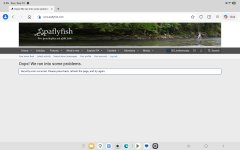
Over the last month I keep getting the attached error on my Galaxy Tab with Microsoft edge. I have tried reinstalling, dumping the cache/history stopping ad block etc and nothing lets it pop up.

Overall works on other devices
Desktop edge - ok
Google pixel with chrome - ok
Galaxy tab with chrome - ok
Galaxy tab with edge - error

Any tips to fix this?
 

Attachments

  • Screenshot_20260913_155520_Edge.jpg
    Screenshot_20260913_155520_Edge.jpg
    74.7 KB · Views: 26
Over the last month I keep getting the attached error on my Galaxy Tab with Microsoft edge. I have tried reinstalling, dumping the cache/history stopping ad block etc and nothing lets it pop up.

Overall works on other devices
Desktop edge - ok
Google pixel with chrome - ok
Galaxy tab with chrome - ok
Galaxy tab with edge - error

Any tips to fix this?
You did all the correct steps and than you for the details. I have made no changes to the site in several months. I have heard from some other people using Android and DuckDuckGo. I'm guessing there maybe an update within Android that has caused some of this. Hard for me to tell.

I do have an option for a minor update to the site that I am reviewing before implementing. Nothing in the update notes suggests a fix for your or other issues like the error message. I'll keep you posted once I make the update.

Thanks
 
You did all the correct steps and than you for the details. I have made no changes to the site in several months. I have heard from some other people using Android and DuckDuckGo. I'm guessing there maybe an update within Android that has caused some of this. Hard for me to tell.

I do have an option for a minor update to the site that I am reviewing before implementing. Nothing in the update notes suggests a fix for your or other issues like the error message. I'll keep you posted once I make the update.

Thanks
Thanks for getting back! On the tablet I did reinstall edge and kept default browser as bing (previously duckduckgo) with no luck, and tried the duckduckgo app with the same message.

Let me know about the update and I will happily troubleshoot through everything again to see if it works
 
If you have a VPN turned on, it will give you this message. Turn it off and you will have acces.
 
If you have a VPN turned on, it will give you this message. Turn it off and you will have acces.
Good idea. It maybe only be certain VPN's. I use a VPN and have no issues. But do check. I do not block VPN's as a feature.

I do restrict country access for signups and allow only the US IP addresses.
 
Last edited:
Yes, I get this error at work only. If I use the notifications to access a forum, read it, then go back. I get this error. I just go back to the home page and access the forums through the Forum link in the header and all is well. I get this no where else. I agree with the VPN theory. My 2 cents
 
Get an Ipad, problem solved! 😉
 
I have a similar issue using DuckDuckGo as my browser on an Android phone with no VPN.

I can't recall if this was problem before a recent Android update because I hardly ever use my phone to access the Internet, let alone PAFF.

However, NO issues using the same phone with NO VPN, but with Firefox as the browser.
 
I have occasionally received the same error message on my iPad. No VPN’s (whatever they are) no Duck Duck Go, just an el dente iPad. I X it out and reopen the site and all is well.
 
I do not. it doesn't happen all the time. and only on my phone. Desktop does not have the issue but is LAN connection.
 
@Bamboozle, @DO_inthewoods and all I did a very small update to the site early this morning. It address mostly some bug fix and security fixes helpful to the site. This is the first update in many months. It may or may not have been helpful to your issue. Please let me know either way.
 
Tom, I just (re)tried with duckduckgo but got the same message after entering user name and password. Still works on chrome.
 
Back
Top